
ASP.NET Core Web API 入門心得 - 必填欄位驗證
TLDR
- 針對
Boolean等實值型別,應使用Nullable型別搭配[Required]屬性來處理必填驗證。 [BindRequired]僅適用於表單資料(Form Data),不適用於[FromBody]的 JSON 請求。- 若需解決 Create 與 Update 共用 DTO 但驗證邏輯不同的問題,可透過自定義
RequiredForTypeAttribute實現。 - 使用自定義 Attribute 時,需搭配
ISchemaFilter同步調整 Swagger 的顯示,以確保 API 文件正確反映欄位必填狀態。
[Required] 與 [BindRequired] 的差異與適用情境
什麼情況下會遇到這個問題:當您需要對 Boolean 等實值型別(Struct)進行必填驗證,但發現預設值(如 false)導致無法判斷使用者是否真的傳入了值。
在 ASP.NET Core 中,若直接使用實值型別,其預設值會導致模型驗證失效。解決方案是將屬性宣告為 Nullable 型別,並搭配 [Required] 屬性。
csharp
public class Input {
    [Required]
    public bool? IsRequired { get; set; }
}當請求傳遞 { } 且 IsRequired 未被賦值時,模型驗證會正確觸發錯誤。
關於 [BindRequired],需特別注意其限制:
- 該屬性僅適用於來自表單(Form Data)的模型繫結。
- 若使用
[FromBody]處理 JSON 資料,[BindRequired]將不會生效。
Update 支援部分欄位更新的驗證策略
什麼情況下會遇到這個問題:當您希望共用 Create 與 Update 的 DTO,但某些欄位在 Create 時為必填,在 Update 時卻為選填(部分更新)。
由於 Attribute 的 Inherited 屬性僅適用於 Class 與 Method,無法直接控制 Property 的驗證行為,建議透過自定義 RequiredForTypeAttribute 來解決。
自定義驗證屬性
透過檢查 validationContext.ObjectType,可以讓同一個屬性在不同類別中呈現不同的驗證結果:
csharp
[AttributeUsage(AttributeTargets.Property | AttributeTargets.Field | AttributeTargets.Parameter, AllowMultiple = false)]
public class RequiredForTypeAttribute : RequiredAttribute {
    public Type[] TargetTypes { get; set; }

    public RequiredForTypeAttribute(params Type[] targetTypes) {
        TargetTypes = targetTypes ?? throw new ArgumentNullException(nameof(targetTypes));
    }

    protected override ValidationResult IsValid(object value, ValidationContext validationContext) {
        if (!TargetTypes.Contains(validationContext.ObjectType) || IsValid(value)) {
            return ValidationResult.Success;
        }

        string[] memberNames = validationContext.MemberName != null ? new string[] { validationContext.MemberName } : null;
        return new ValidationResult(FormatErrorMessage(validationContext.DisplayName), memberNames);
    }
}配合 Swagger 顯示調整
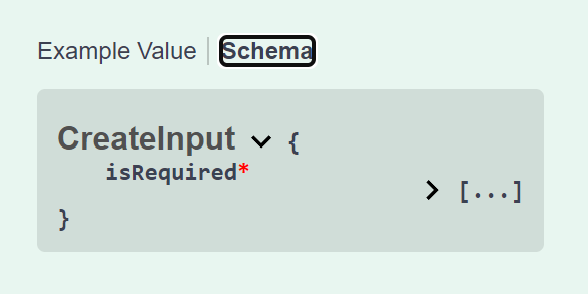
若使用上述自定義屬性,Swagger 可能無法自動識別必填狀態,需實作 ISchemaFilter 來手動調整:
csharp
public class RequiredForTypeSchemaFilter : ISchemaFilter {
    public void Apply(OpenApiSchema schema, SchemaFilterContext context) {
        if (schema.Properties is null) return;

        foreach (PropertyInfo prop in context.Type.GetProperties()) {
            var attr = prop.GetCustomAttributes<RequiredForTypeAttribute>().FirstOrDefault();

            if (attr is not null && !attr.TargetTypes.Contains(context.Type)) {
                foreach (var schemaPropPair in schema.Properties) {
                    if (string.Equals(schemaPropPair.Key, prop.Name, StringComparison.OrdinalIgnoreCase)) {
                        schema.Required.Remove(schemaPropPair.Key);
                        break;
                    }
                }
            }
        }
    }
}
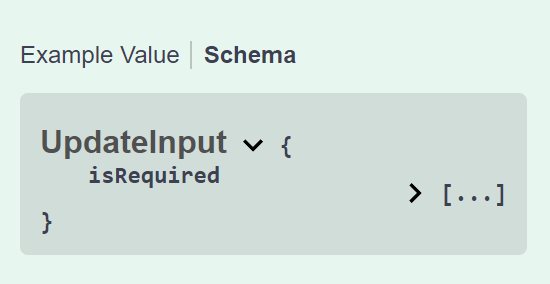
異動歷程
- 2024-04-13 初版文件建立。